第 18 节 · SECTION 18
The Slice Type
The Slice Type
Slices let you reference a contiguous sequence of elements in a collection. A slice is a kind of reference, so it does not have ownership.
Here’s a small programming problem: Write a function that takes a string of words separated by spaces and returns the first word it finds in that string. If the function doesn’t find a space in the string, the whole string must be one word, so the entire string should be returned.
Note: For the purposes of introducing slices, we are assuming ASCII only in this section; a more thorough discussion of UTF-8 handling is in the “Storing UTF-8 Encoded Text with Strings” section of Chapter 8.
Let’s work through how we’d write the signature of this function without using slices, to understand the problem that slices will solve:
fn first_word(s: &String) -> ?
The first_word function has a parameter of type &String. We don’t need
ownership, so this is fine. (In idiomatic Rust, functions do not take ownership
of their arguments unless they need to, and the reasons for that will become
clear as we keep going.) But what should we return? We don’t really have a way
to talk about part of a string. However, we could return the index of the end
of the word, indicated by a space. Let’s try that, as shown in Listing 4-7.
Listing 4-7: The first_word function that returns a byte index value into the String parameter
Filename: src/main.rs
fn first_word(s: &String) -> usize {
    let bytes = s.as_bytes();

    for (i, &item) in bytes.iter().enumerate() {
        if item == b' ' {
            return i;
        }
    }

    s.len()
}
Because we need to go through the String element by element and check whether
a value is a space, we’ll convert our String to an array of bytes using the
as_bytes method.
let bytes = s.as_bytes();
Next, we create an iterator over the array of bytes using the iter method:
for (i, &item) in bytes.iter().enumerate() {
We’ll discuss iterators in more detail in Chapter 13.
For now, know that iter is a method that returns each element in a collection
and that enumerate wraps the result of iter and returns each element as
part of a tuple instead. The first element of the tuple returned from
enumerate is the index, and the second element is a reference to the element.
This is a bit more convenient than calculating the index ourselves.
Because the enumerate method returns a tuple, we can use patterns to
destructure that tuple. We’ll be discussing patterns more in Chapter
6. In the for loop, we specify a pattern that has i
for the index in the tuple and &item for the single byte in the tuple.
Because we get a reference to the element from .iter().enumerate(), we use
& in the pattern.
Inside the for loop, we search for the byte that represents the space by
using the byte literal syntax. If we find a space, we return the position.
Otherwise, we return the length of the string by using s.len().
        if item == b' ' {
            return i;
        }
    }

    s.len()
We now have a way to find out the index of the end of the first word in the
string, but there’s a problem. We’re returning a usize on its own, but it’s
only a meaningful number in the context of the &String. In other words,
because it’s a separate value from the String, there’s no guarantee that it
will still be valid in the future. Consider the program in Listing 4-8 that
uses the first_word function from Listing 4-7.
Listing 4-8: Storing the result from calling the first_word function and then changing the String contents
Filename: src/main.rs
fn main() {
    let mut s = String::from("hello world");

    let word = first_word(&s); // word will get the value 5

    s.clear(); // this empties the String, making it equal to ""

    // word still has the value 5 here, but s no longer has any content that we
    // could meaningfully use with the value 5, so word is now totally invalid!
}
This program compiles without any errors and would also do so if we used word
after calling s.clear(). Because word isn’t connected to the state of s
at all, word still contains the value 5. We could use that value 5 with
the variable s to try to extract the first word out, but this would be a bug
because the contents of s have changed since we saved 5 in word.
Having to worry about the index in word getting out of sync with the data in
s is tedious and error-prone! Managing these indices is even more brittle if
we write a second_word function. Its signature would have to look like this:
fn second_word(s: &String) -> (usize, usize) {
Now we’re tracking a starting and an ending index, and we have even more values that were calculated from data in a particular state but aren’t tied to that state at all. We have three unrelated variables floating around that need to be kept in sync.
Luckily, Rust has a solution to this problem: string slices.
String Slices
A string slice is a reference to a contiguous sequence of the elements of a
String, and it looks like this:
    let s = String::from("hello world");

    let hello = &s[0..5];
    let world = &s[6..11];
Rather than a reference to the entire String, hello is a reference to a
portion of the String, specified in the extra [0..5] bit. We create slices
using a range within square brackets by specifying
[starting_index..ending_index], where starting_index is the first
position in the slice and ending_index is one more than the last position
in the slice. Internally, the slice data structure stores the starting position
and the length of the slice, which corresponds to ending_index minus
starting_index. So, in the case of let world = &s[6..11];, world would
be a slice that contains a pointer to the byte at index 6 of s with a length
value of 5.
Figure 4-7 shows this in a diagram.
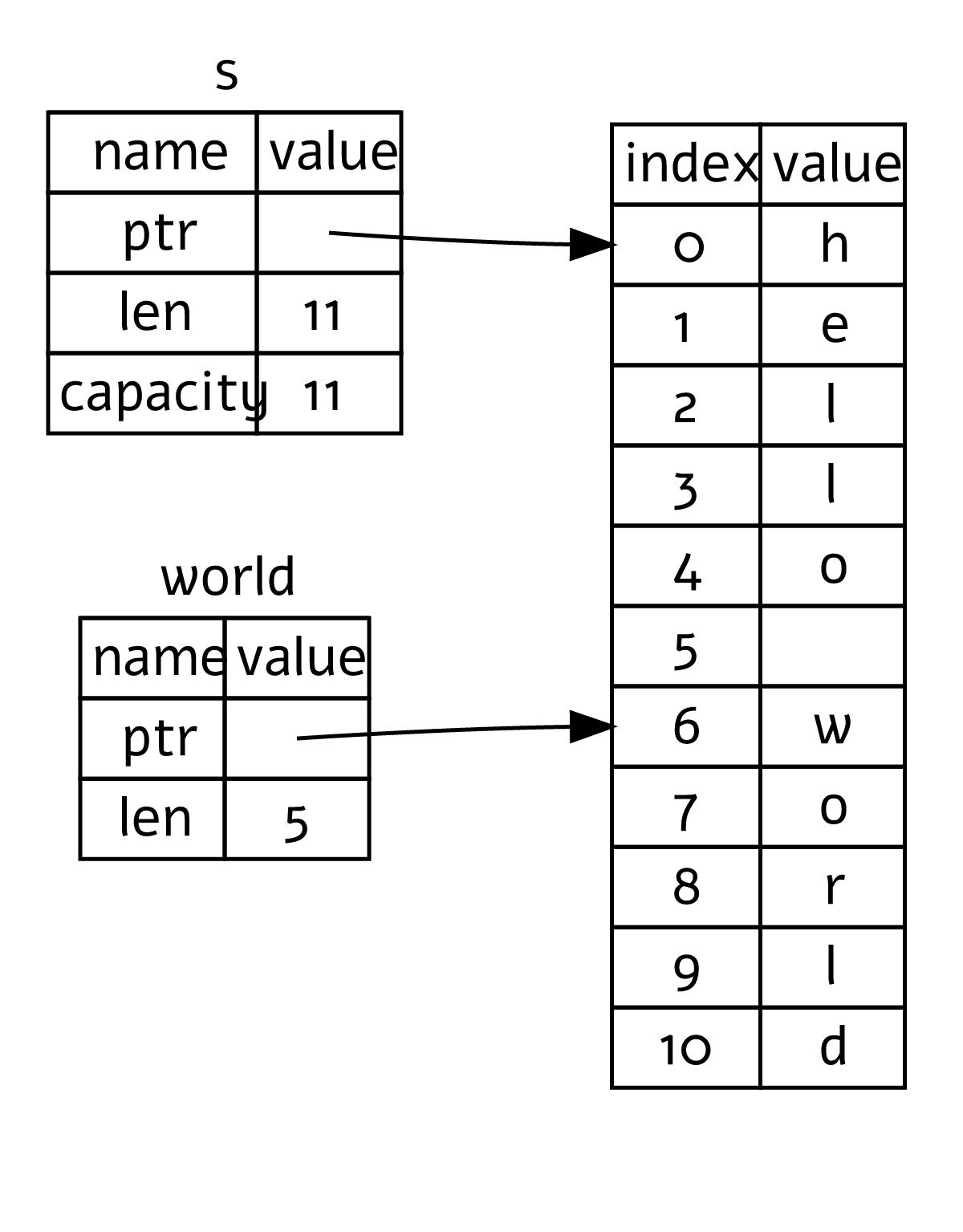
Figure 4-7: A string slice referring to part of a
String
With Rust’s .. range syntax, if you want to start at index 0, you can drop
the value before the two periods. In other words, these are equal:
let s = String::from("hello");

let slice = &s[0..2];
let slice = &s[..2];
By the same token, if your slice includes the last byte of the String, you
can drop the trailing number. That means these are equal:
let s = String::from("hello");

let len = s.len();

let slice = &s[3..len];
let slice = &s[3..];
You can also drop both values to take a slice of the entire string. So, these are equal:
let s = String::from("hello");

let len = s.len();

let slice = &s[0..len];
let slice = &s[..];
Note: String slice range indices must occur at valid UTF-8 character boundaries. If you attempt to create a string slice in the middle of a multibyte character, your program will exit with an error.
With all this information in mind, let’s rewrite first_word to return a
slice. The type that signifies “string slice” is written as &str:
Filename: src/main.rs
fn first_word(s: &String) -> &str {
    let bytes = s.as_bytes();

    for (i, &item) in bytes.iter().enumerate() {
        if item == b' ' {
            return &s[0..i];
        }
    }

    &s[..]
}
We get the index for the end of the word the same way we did in Listing 4-7, by looking for the first occurrence of a space. When we find a space, we return a string slice using the start of the string and the index of the space as the starting and ending indices.
Now when we call first_word, we get back a single value that is tied to the
underlying data. The value is made up of a reference to the starting point of
the slice and the number of elements in the slice.
Returning a slice would also work for a second_word function:
fn second_word(s: &String) -> &str {
We now have a straightforward API that’s much harder to mess up because the
compiler will ensure that the references into the String remain valid.
Remember the bug in the program in Listing 4-8, when we got the index to the
end of the first word but then cleared the string so our index was invalid?
That code was logically incorrect but didn’t show any immediate errors. The
problems would show up later if we kept trying to use the first word index with
an emptied string. Slices make this bug impossible and let us know much sooner
that we have a problem with our code. Using the slice version of first_word
will throw a compile-time error:
Filename: src/main.rs
fn main() {
    let mut s = String::from("hello world");

    let word = first_word(&s);

    s.clear(); // error!

    println!("the first word is: {word}");
}
Here’s the compiler error:
$ cargo run
   Compiling ownership v0.1.0 (file:///projects/ownership)
error[E0502]: cannot borrow `s` as mutable because it is also borrowed as immutable
  --> src/main.rs:18:5
   |
16 |     let word = first_word(&s);
   |                           -- immutable borrow occurs here
17 |
18 |     s.clear(); // error!
   |     ^^^^^^^^^ mutable borrow occurs here
19 |
20 |     println!("the first word is: {word}");
   |                                   ---- immutable borrow later used here

For more information about this error, try `rustc --explain E0502`.
error: could not compile `ownership` (bin "ownership") due to 1 previous error
Recall from the borrowing rules that if we have an immutable reference to
something, we cannot also take a mutable reference. Because clear needs to
truncate the String, it needs to get a mutable reference. The println!
after the call to clear uses the reference in word, so the immutable
reference must still be active at that point. Rust disallows the mutable
reference in clear and the immutable reference in word from existing at the
same time, and compilation fails. Not only has Rust made our API easier to use,
but it has also eliminated an entire class of errors at compile time!
String Literals as Slices
Recall that we talked about string literals being stored inside the binary. Now that we know about slices, we can properly understand string literals:
let s = "Hello, world!";
The type of s here is &str: It’s a slice pointing to that specific point of
the binary. This is also why string literals are immutable; &str is an
immutable reference.
String Slices as Parameters
Knowing that you can take slices of literals and String values leads us to
one more improvement on first_word, and that’s its signature:
fn first_word(s: &String) -> &str {
A more experienced Rustacean would write the signature shown in Listing 4-9
instead because it allows us to use the same function on both &String values
and &str values.
Listing 4-9: Improving the first_word function by using a string slice for the type of the s parameter
fn first_word(s: &str) -> &str {
If we have a string slice, we can pass that directly. If we have a String, we
can pass a slice of the String or a reference to the String. This
flexibility takes advantage of deref coercions, a feature we will cover in
the “Using Deref Coercions in Functions and Methods” section of Chapter 15.
Defining a function to take a string slice instead of a reference to a String
makes our API more general and useful without losing any functionality:
Filename: src/main.rs
fn main() {
    let my_string = String::from("hello world");

    // `first_word` works on slices of `String`s, whether partial or whole.
    let word = first_word(&my_string[0..6]);
    let word = first_word(&my_string[..]);
    // `first_word` also works on references to `String`s, which are equivalent
    // to whole slices of `String`s.
    let word = first_word(&my_string);

    let my_string_literal = "hello world";

    // `first_word` works on slices of string literals, whether partial or
    // whole.
    let word = first_word(&my_string_literal[0..6]);
    let word = first_word(&my_string_literal[..]);

    // Because string literals *are* string slices already,
    // this works too, without the slice syntax!
    let word = first_word(my_string_literal);
}
Other Slices
String slices, as you might imagine, are specific to strings. But there’s a more general slice type too. Consider this array:
let a = [1, 2, 3, 4, 5];
Just as we might want to refer to part of a string, we might want to refer to part of an array. We’d do so like this:
let a = [1, 2, 3, 4, 5];

let slice = &a[1..3];

assert_eq!(slice, &[2, 3]);
This slice has the type &[i32]. It works the same way as string slices do, by
storing a reference to the first element and a length. You’ll use this kind of
slice for all sorts of other collections. We’ll discuss these collections in
detail when we talk about vectors in Chapter 8.
Summary
The concepts of ownership, borrowing, and slices ensure memory safety in Rust programs at compile time. The Rust language gives you control over your memory usage in the same way as other systems programming languages. But having the owner of data automatically clean up that data when the owner goes out of scope means you don’t have to write and debug extra code to get this control.
Ownership affects how lots of other parts of Rust work, so we’ll talk about
these concepts further throughout the rest of the book. Let’s move on to
Chapter 5 and look at grouping pieces of data together in a struct.