第 79 节 · SECTION 79
Fundamentals of Asynchronous Programming: Async, Await, Futures, and Streams
Many operations we ask the computer to do can take a while to finish. It would be nice if we could do something else while we’re waiting for those long-running processes to complete. Modern computers offer two techniques for working on more than one operation at a time: parallelism and concurrency. Our programs’ logic, however, is written in a mostly linear fashion. We’d like to be able to specify the operations a program should perform and points at which a function could pause and some other part of the program could run instead, without needing to specify up front exactly the order and manner in which each bit of code should run. Asynchronous programming is an abstraction that lets us express our code in terms of potential pausing points and eventual results that takes care of the details of coordination for us.
This chapter builds on Chapter 16’s use of threads for parallelism and
concurrency by introducing an alternative approach to writing code: Rust’s
futures, streams, and the async and await syntax that let us express how
operations could be asynchronous, and the third-party crates that implement
asynchronous runtimes: code that manages and coordinates the execution of
asynchronous operations.
Let’s consider an example. Say you’re exporting a video you’ve created of a family celebration, an operation that could take anywhere from minutes to hours. The video export will use as much CPU and GPU power as it can. If you had only one CPU core and your operating system didn’t pause that export until it completed—that is, if it executed the export synchronously—you couldn’t do anything else on your computer while that task was running. That would be a pretty frustrating experience. Fortunately, your computer’s operating system can, and does, invisibly interrupt the export often enough to let you get other work done simultaneously.
Now say you’re downloading a video shared by someone else, which can also take a while but does not take up as much CPU time. In this case, the CPU has to wait for data to arrive from the network. While you can start reading the data once it starts to arrive, it might take some time for all of it to show up. Even once the data is all present, if the video is quite large, it could take at least a second or two to load it all. That might not sound like much, but it’s a very long time for a modern processor, which can perform billions of operations every second. Again, your operating system will invisibly interrupt your program to allow the CPU to perform other work while waiting for the network call to finish.
The video export is an example of a CPU-bound or compute-bound operation. It’s limited by the computer’s potential data processing speed within the CPU or GPU, and how much of that speed it can dedicate to the operation. The video download is an example of an I/O-bound operation, because it’s limited by the speed of the computer’s input and output; it can only go as fast as the data can be sent across the network.
In both of these examples, the operating system’s invisible interrupts provide a form of concurrency. That concurrency happens only at the level of the entire program, though: the operating system interrupts one program to let other programs get work done. In many cases, because we understand our programs at a much more granular level than the operating system does, we can spot opportunities for concurrency that the operating system can’t see.
For example, if we’re building a tool to manage file downloads, we should be able to write our program so that starting one download won’t lock up the UI, and users should be able to start multiple downloads at the same time. Many operating system APIs for interacting with the network are blocking, though; that is, they block the program’s progress until the data they’re processing is completely ready.
Note: This is how most function calls work, if you think about it. However, the term blocking is usually reserved for function calls that interact with files, the network, or other resources on the computer, because those are the cases where an individual program would benefit from the operation being non-blocking.
We could avoid blocking our main thread by spawning a dedicated thread to download each file. However, the overhead of the system resources used by those threads would eventually become a problem. It would be preferable if the call didn’t block in the first place, and instead we could define a number of tasks that we’d like our program to complete and allow the runtime to choose the best order and manner in which to run them.
That is exactly what Rust’s async (short for asynchronous) abstraction gives us. In this chapter, you’ll learn all about async as we cover the following topics:
- How to use Rust’s
asyncandawaitsyntax and execute asynchronous functions with a runtime - How to use the async model to solve some of the same challenges we looked at in Chapter 16
- How multithreading and async provide complementary solutions that you can combine in many cases
Before we see how async works in practice, though, we need to take a short detour to discuss the differences between parallelism and concurrency.
Parallelism and Concurrency
We’ve treated parallelism and concurrency as mostly interchangeable so far. Now we need to distinguish between them more precisely, because the differences will show up as we start working.
Consider the different ways a team could split up work on a software project. You could assign a single member multiple tasks, assign each member one task, or use a mix of the two approaches.
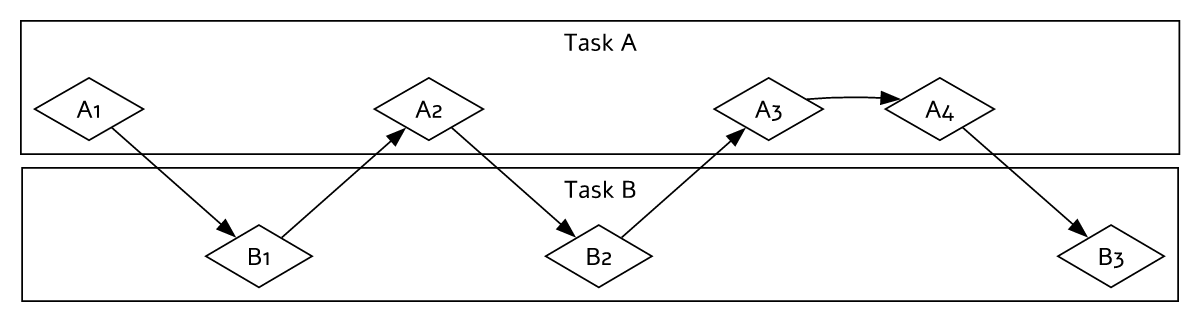
When an individual works on several different tasks before any of them is complete, this is concurrency. One way to implement concurrency is similar to having two different projects checked out on your computer, and when you get bored or stuck on one project, you switch to the other. You’re just one person, so you can’t make progress on both tasks at the exact same time, but you can multitask, making progress on one at a time by switching between them (see Figure 17-1).
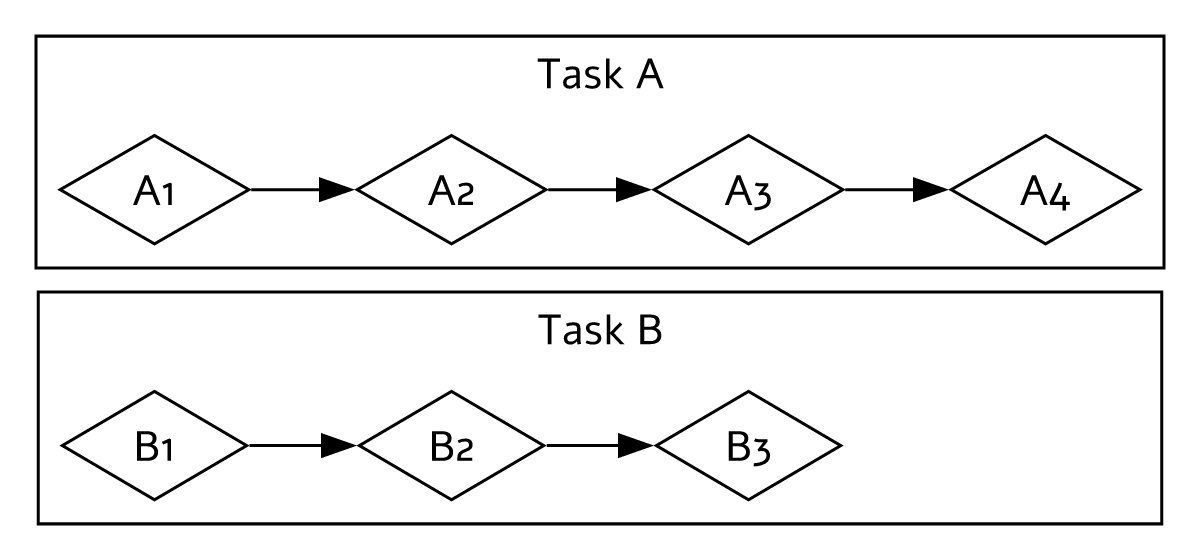
When the team splits up a group of tasks by having each member take one task and work on it alone, this is parallelism. Each person on the team can make progress at the exact same time (see Figure 17-2).
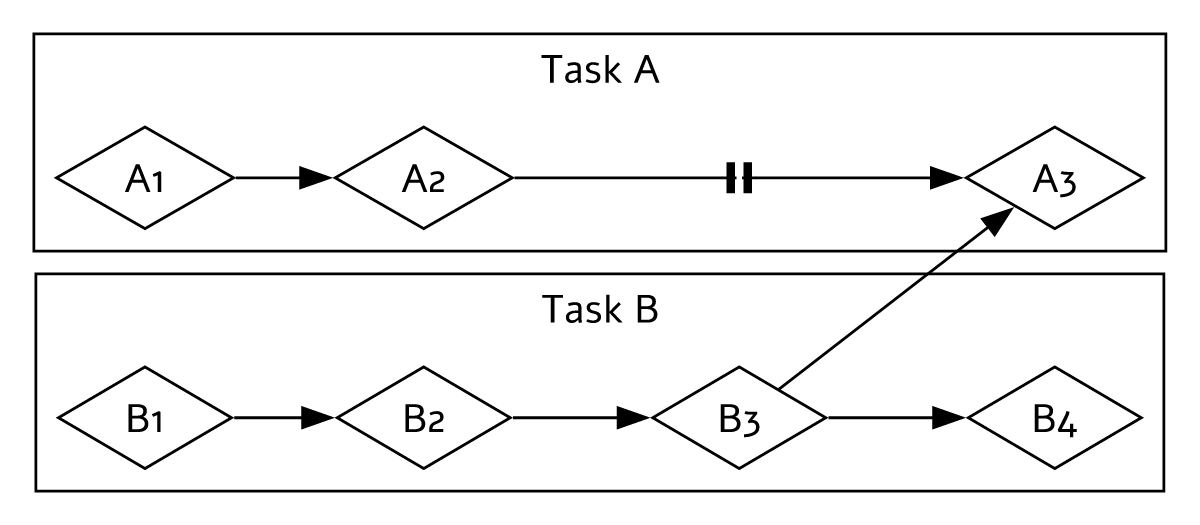
In both of these workflows, you might have to coordinate between different tasks. Maybe you thought the task assigned to one person was totally independent from everyone else’s work, but it actually requires another person on the team to finish their task first. Some of the work could be done in parallel, but some of it was actually serial: it could only happen in a series, one task after the other, as in Figure 17-3.
Likewise, you might realize that one of your own tasks depends on another of your tasks. Now your concurrent work has also become serial.
Parallelism and concurrency can intersect with each other, too. If you learn that a colleague is stuck until you finish one of your tasks, you’ll probably focus all your efforts on that task to “unblock” your colleague. You and your coworker are no longer able to work in parallel, and you’re also no longer able to work concurrently on your own tasks.
The same basic dynamics come into play with software and hardware. On a machine with a single CPU core, the CPU can perform only one operation at a time, but it can still work concurrently. Using tools such as threads, processes, and async, the computer can pause one activity and switch to others before eventually cycling back to that first activity again. On a machine with multiple CPU cores, it can also do work in parallel. One core can be performing one task while another core performs a completely unrelated one, and those operations actually happen at the same time.
Running async code in Rust usually happens concurrently. Depending on the hardware, the operating system, and the async runtime we are using (more on async runtimes shortly), that concurrency may also use parallelism under the hood.
Now, let’s dive into how async programming in Rust actually works.